 All work




 Resume
Context
No free route planner takes more than 10 addresses. A delivery driver runs about 16 stops a wave, 3 waves a day.
So the driver plans on pen and paper, misses priority deliveries and ends up rushing. Each stop has a delivery window, and some are priority.
The constraint: free for drivers and free to run. That set the stack: no accounts, no database, routes saved on the phone.
The flow
5 screens take a driver from a pasted list to a finished wave.
-
01
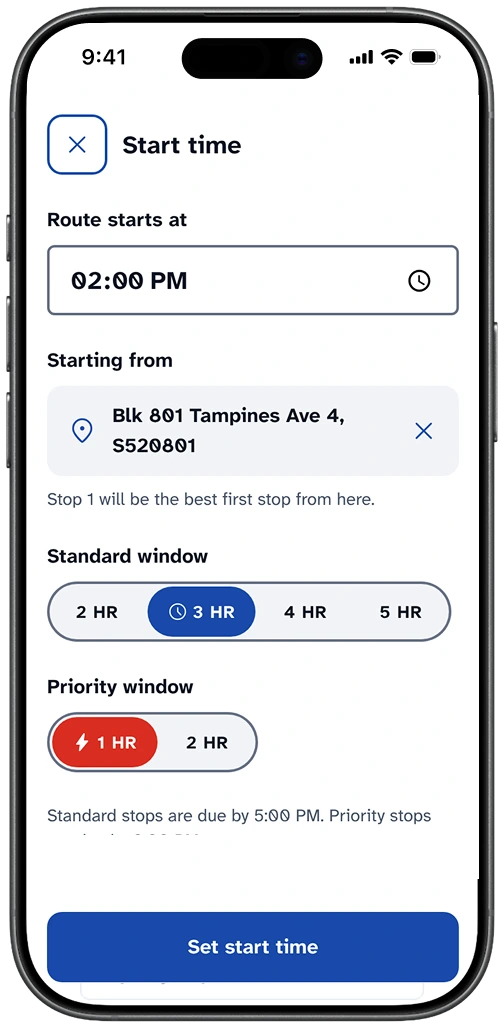
Set the start
The driver picks when the wave starts and sets the window lengths: 3 hours standard, 1 hour priority. A starting point is optional: type an address or use the phone’s location.
-
02
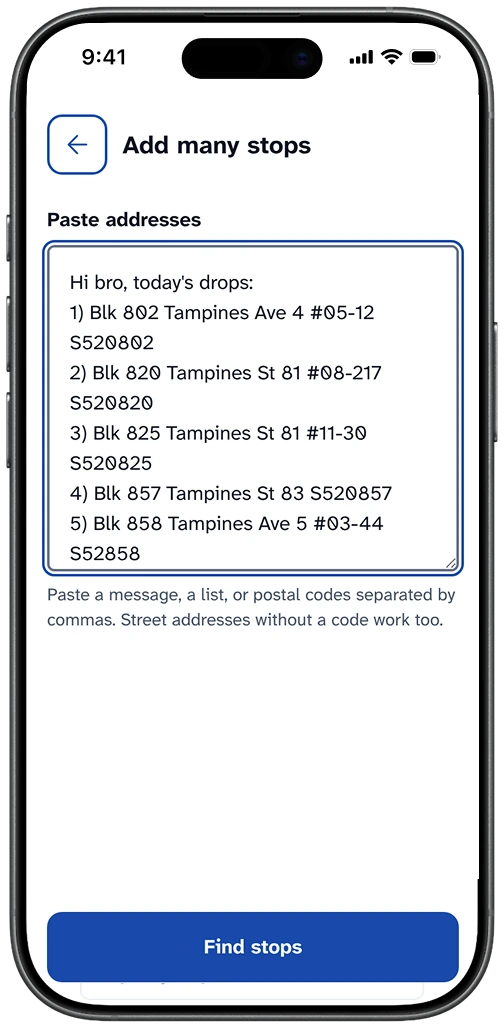
Paste stops
Addresses or bare postal codes, separated by commas, all in one go. Drivers already get their stops as a list, so the app takes the list as it comes.
-
03
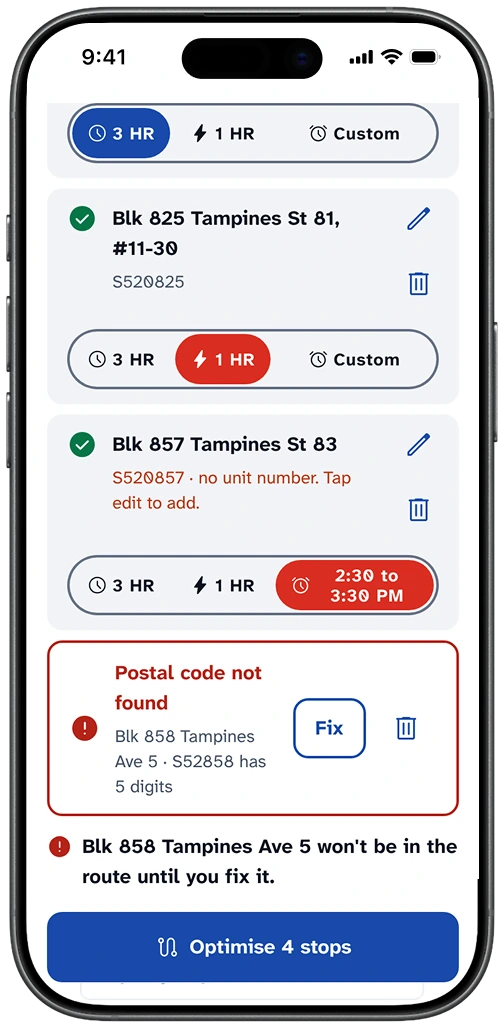
Review
Each stop gets a standard window, a priority window or a custom time. Postal codes the app can’t find get Fix or delete, and they don’t block the rest.
-
04
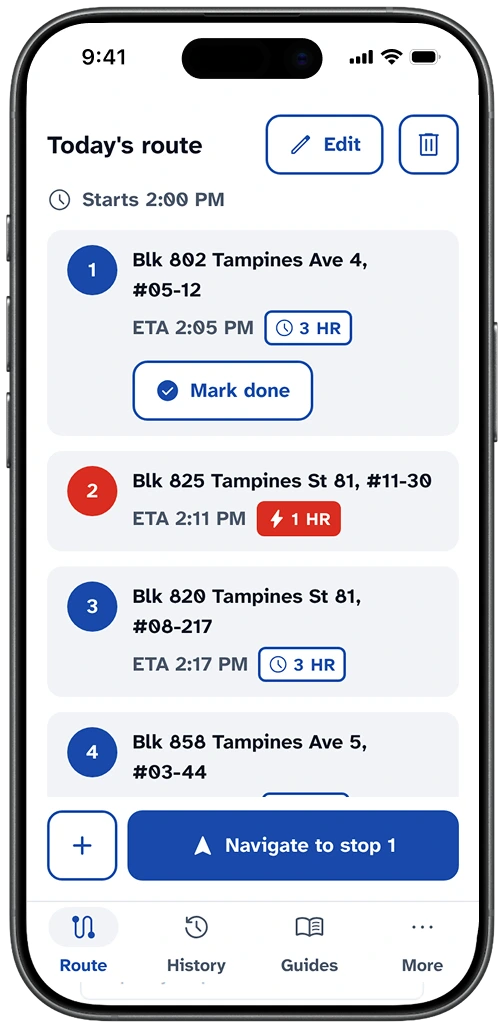
Optimise
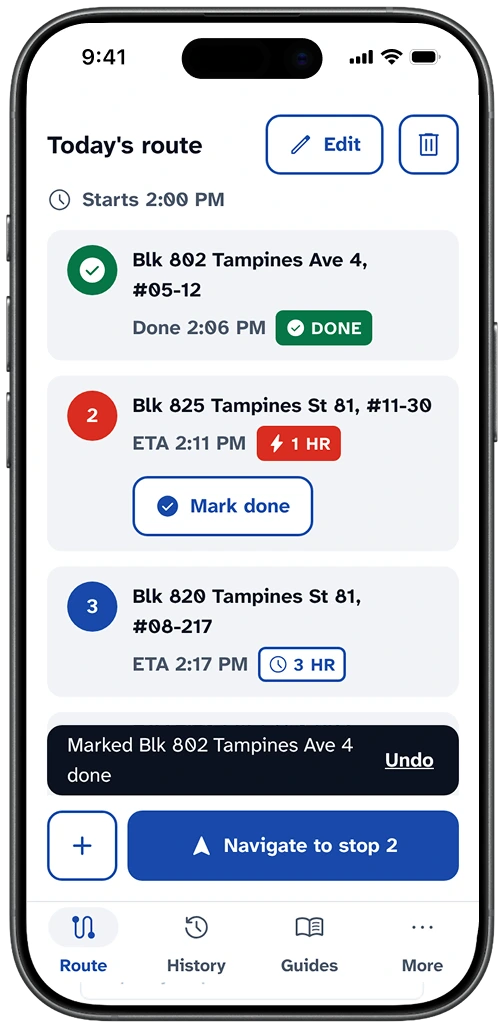
Each row shows an ETA, and “Navigate to stop N” opens Google Maps or Waze, whichever the driver set in Settings.
-
05
Mark done
An Undo toast confirms it, the stop greys out and the next one scrolls to the top. If the route runs late, a banner offers Re-optimise.
Decisions
No GPS
The main button always reads “Navigate to stop N”, and the driver’s map app does the turn-by-turn. Settings offers Google Maps or Waze, and that choice becomes the default for every Navigate button.
“Mark done”, not “Delivered”
RouteLah plans routes. It doesn’t confirm deliveries, so v1 has no failed-delivery path.
Unfixed stops don’t block
A postal code the app can’t find moves to a Needs fixing row, and the driver can still optimise the rest.
Custom times inside the wave
A wave can run 8:00 to 11:00 with one scheduled delivery at 9:30 to 10:30. The route plans around that slot and the priority stops, so the driver reaches the scheduled stop neither too early nor too late.
Drivers get waves by area, for example Jurong with Bukit Batok, Tengah and Choa Chu Kang, so stops sit close together and clashes are rare. When the stops still don’t fit, the driver lengthens the standard window from 3 to 4 or 5 hours. Drivers have no hard end time, only a minimum of 3 waves a day.
1 fixed stop time
Every stop gets 3 minutes. A fixed time lets the app calculate every ETA and warn early when the route will run late.
Warn only where it matters
The “No unit number” warning shows only for HDB flats and condos, not landed houses. It can guess wrong, which is fine while drivers don’t use the app to find unit numbers.
Built for reading at a glance
I set Atkinson Hyperlegible Next, a typeface designed for legibility, instead of Inter. I gave the add icon weight 600 because 400 looked too thin, and lightened the dark-mode blue for contrast.
Outcomes
Live and installable on a phone at routelah.pages.dev.
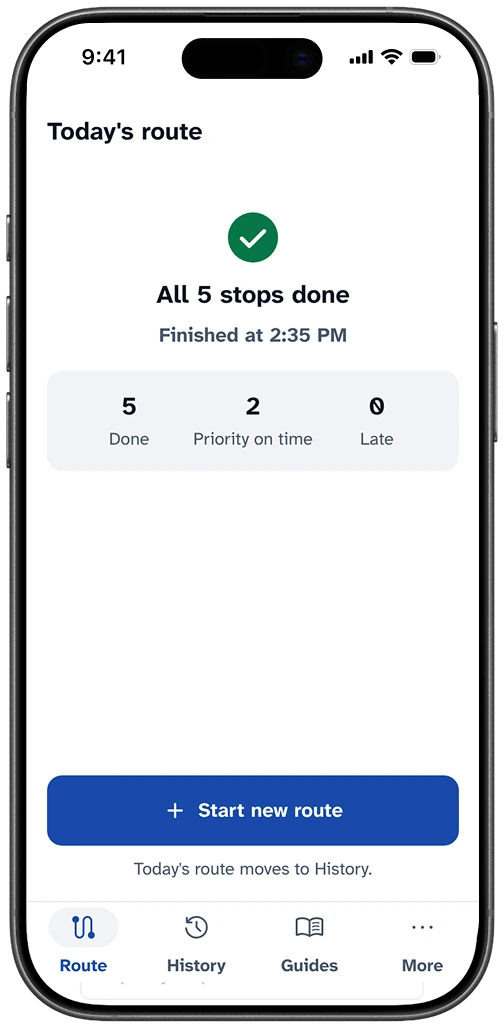
Testing is under way. I will track completed routes, priority stops delivered on time (the Priority on time count on the Route complete screen), and whether the driver keeps using the app.
Next
- Test on the driver’s real waves, then add a Reflection chapter with what changed.
- Finish launch: Search Console sitemap, privacy policy, app icon.
Next version
- Extend from the LateBanner. When a route runs late, the banner offers “Extend window to 4 hr” directly, so the driver doesn’t go back to Start time.
- Add stops from a photo. Drivers receive a printed address list. A photo of it fills the paste list, and the review screen catches any address read wrongly.
Try it on your phone. routelah.pages.dev
Open the app